

The queue is filling up.
Make sure nothing slips.
For the support lead, the operations manager and the team juggling four inboxes at once. The ticketing platform pulls every channel into one queue, tracks the SLA on every ticket, and surfaces the at-risk ones before the customer has to chase.
30 minutes. No pitch. A clear read on what is leaking out of your support queue today.
Days
To Go Live
1 Inbox
Every Channel
24/7
SLA Tracked
50%+
Faster Replies
Every missed ticket is a customer that escalates
Every support lead the team works with says the same thing. The inbox never empties. The SLA breach lands before the at-risk alert does. The director ends up in the loop because the queue did not own itself.
Jake's complaints are spread across four inboxes
Email here, WhatsApp there, the contact form goes to whoever opens it first. Three people end up replying to the same customer. Nothing tracked, nothing closed.
Mia finds the SLA breach after the customer escalates
The ticket sat in a queue nobody owned. By the time the lead spotted it, the customer had emailed the director. The team is firefighting the apology instead of the issue.
Sam's team answers the same question fifty times a day
'Where's my invoice? How do I reset my router? Are you open Sunday?' Every agent typing the same reply, slightly differently, all day. No macros. No knowledge base. No deflection.
Priya runs the weekly report on a spreadsheet at midnight
Pulling CSV exports, copy-pasting into Excel, mailing the PDF before the Monday meeting. Half the numbers are stale by the time the team reads them.
From drowning in inboxes, to a queue that owns itself
Four moves the team makes with every support operation the platform partners with.
Sound like you?
You run a team that talks to customers. Complaints, enquiries, billing questions, outages. Tickets arrive on every channel and nobody has a clean view of who owns what. The Friday afternoon queue rolls into Monday.
Here's the problem
Tickets get missed because nobody owns them. SLAs breach because nobody saw them coming. The same questions get asked over and over because there's no knowledge base to deflect them. Your team is busy but the customer is still waiting.
Here's the fix
One unified inbox for every channel. SLA timers running on every ticket. Macros that cut response time in half. A knowledge base that answers the repeat questions on its own. Routing that puts the ticket in front of the right agent, first time.
How you switch it on
Hand over the channels, the team structure, the SLA targets, the top twenty questions you get asked. The team configures the queues, the macros, the escalation rules. You're live in days with the queue already moving, not in six months with a manual.
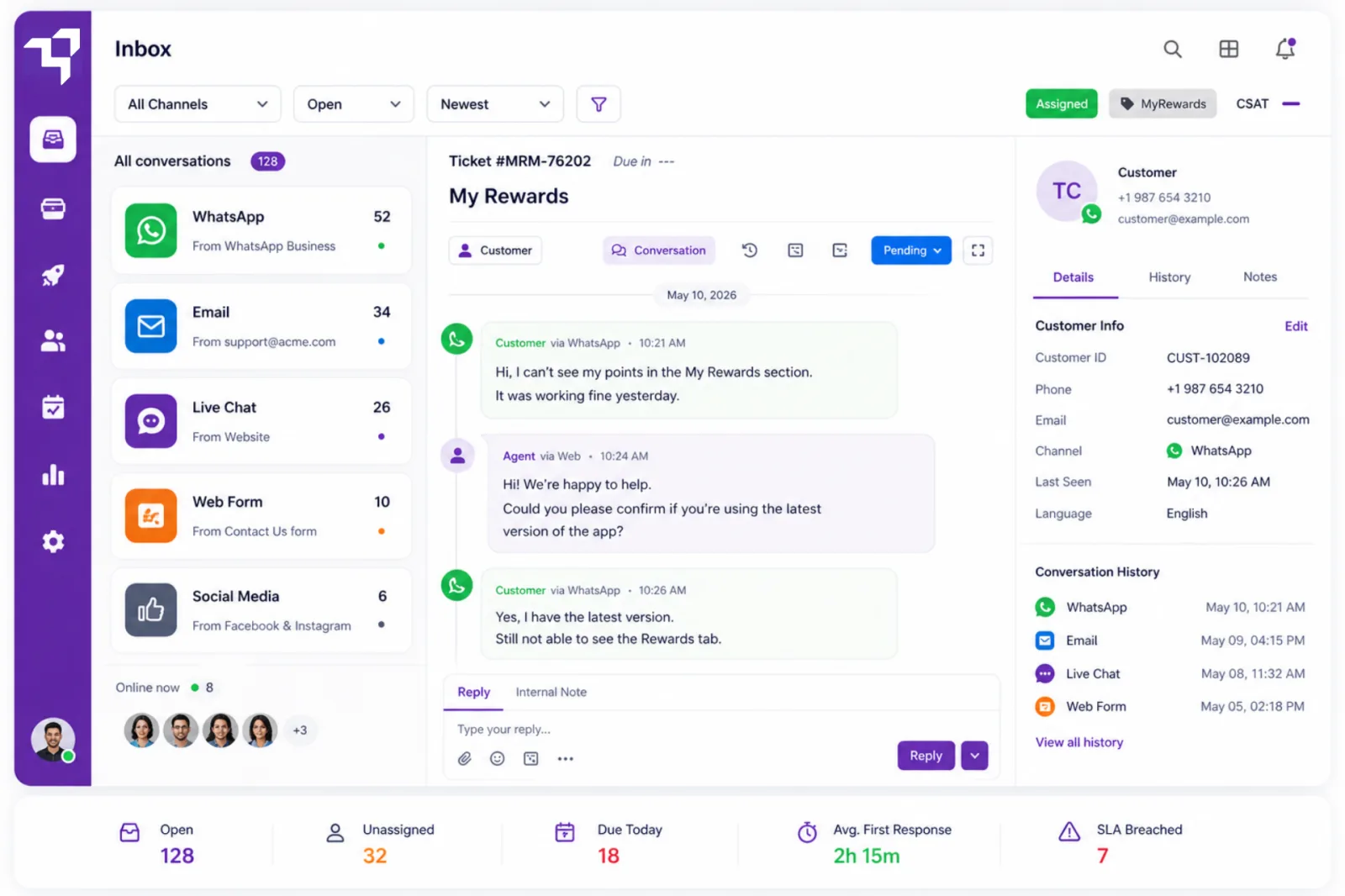
Every channel, in one queue the team actually works from
WhatsApp, email, live chat, web forms, social. They all land in the same inbox with the full customer history attached. No tab switching, no copy-pasting between systems. The agent sees the conversation, not the channel.
- WhatsApp, email, chat and web forms unified from day one
- Full customer history across every channel on every ticket
- Auto-routing to the right team by channel, language or tag
- Consistent SLA timers running on every channel
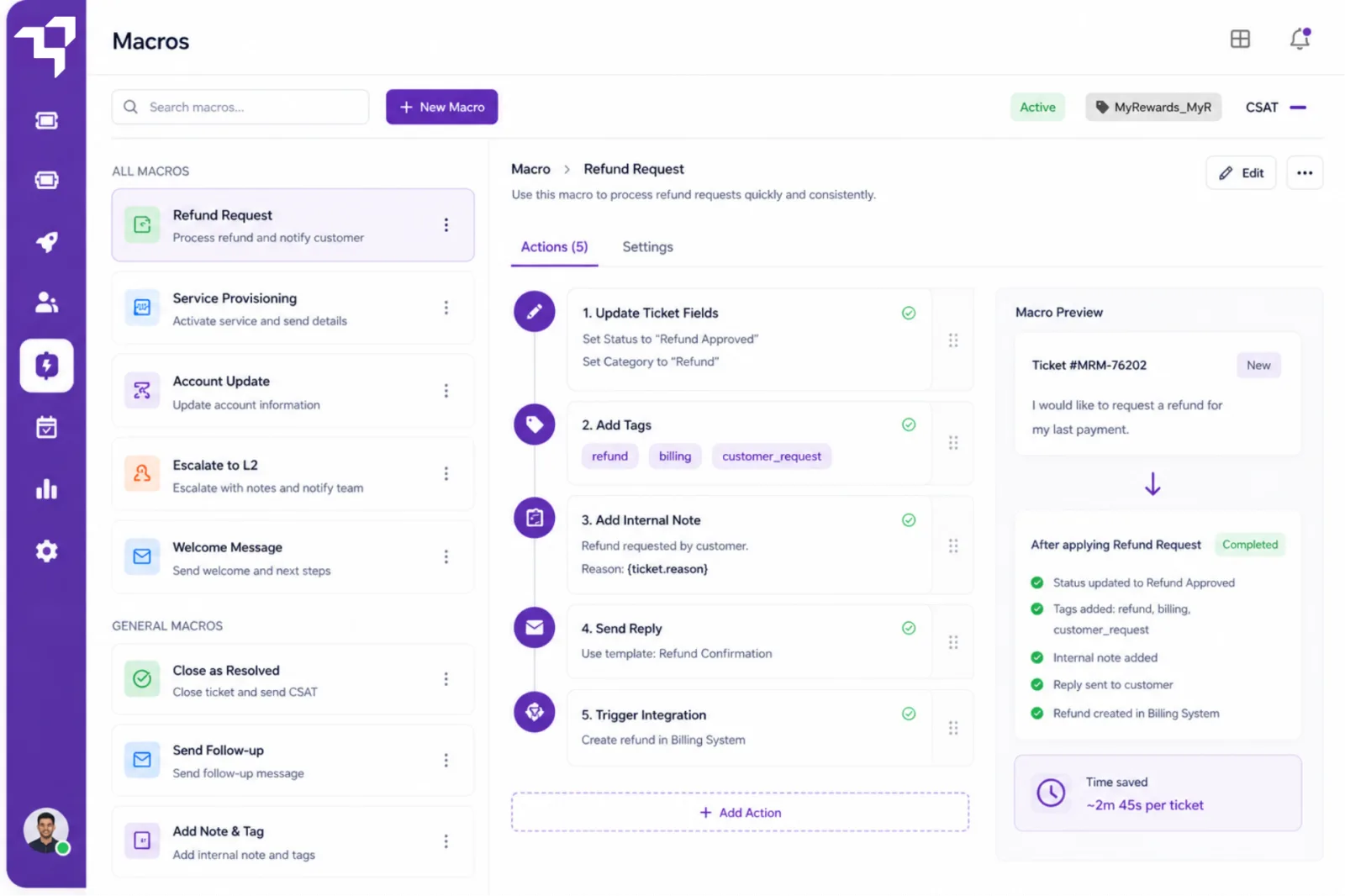
One click. The whole reply, the tag, the next step, done.
Bundle the templated reply, the field update, the tag and the next action into a single macro. Refund requests, service provisioning, complaint acknowledgements. The team stays consistent across shifts and the response time drops by half on the first day.
- Bundle reply, fields, tags and next steps into one click
- Pre-built templates for refunds, escalations and provisioning
- Apply macros automatically based on ticket conditions
- Keep tone and structure consistent across every agent
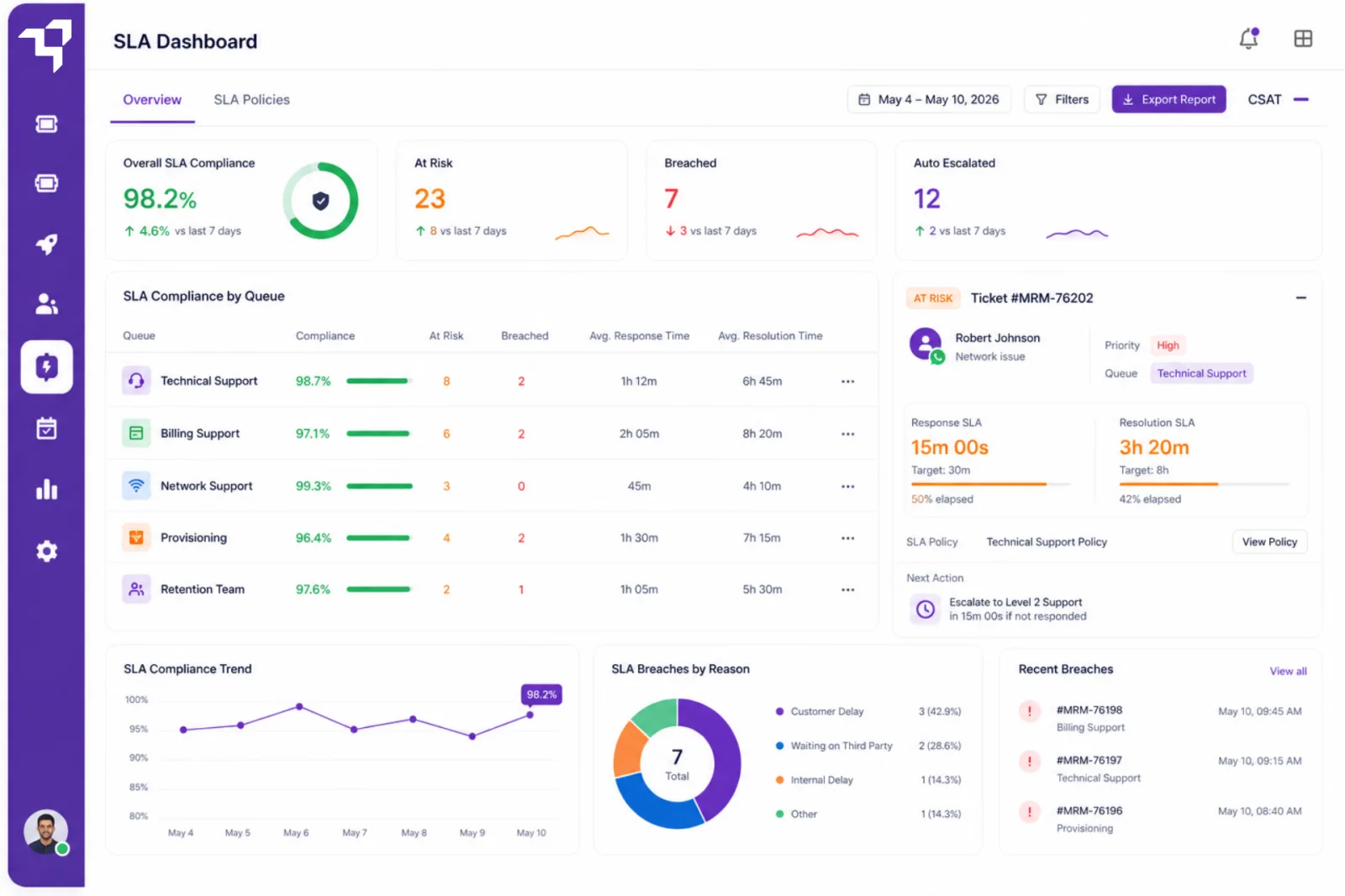
See the SLA breach coming. Stop it before it lands.
Set response and resolution targets per queue. The platform tracks every ticket against its clock and surfaces the at-risk ones before the deadline. Auto-escalation reassigns or notifies the lead so the customer never has to be the one who chases.
- Response and resolution targets per queue and priority
- At-risk indicators long before the breach window opens
- Auto-escalation by tier, queue or sentiment
- Audit-ready SLA compliance reports for regulated industries
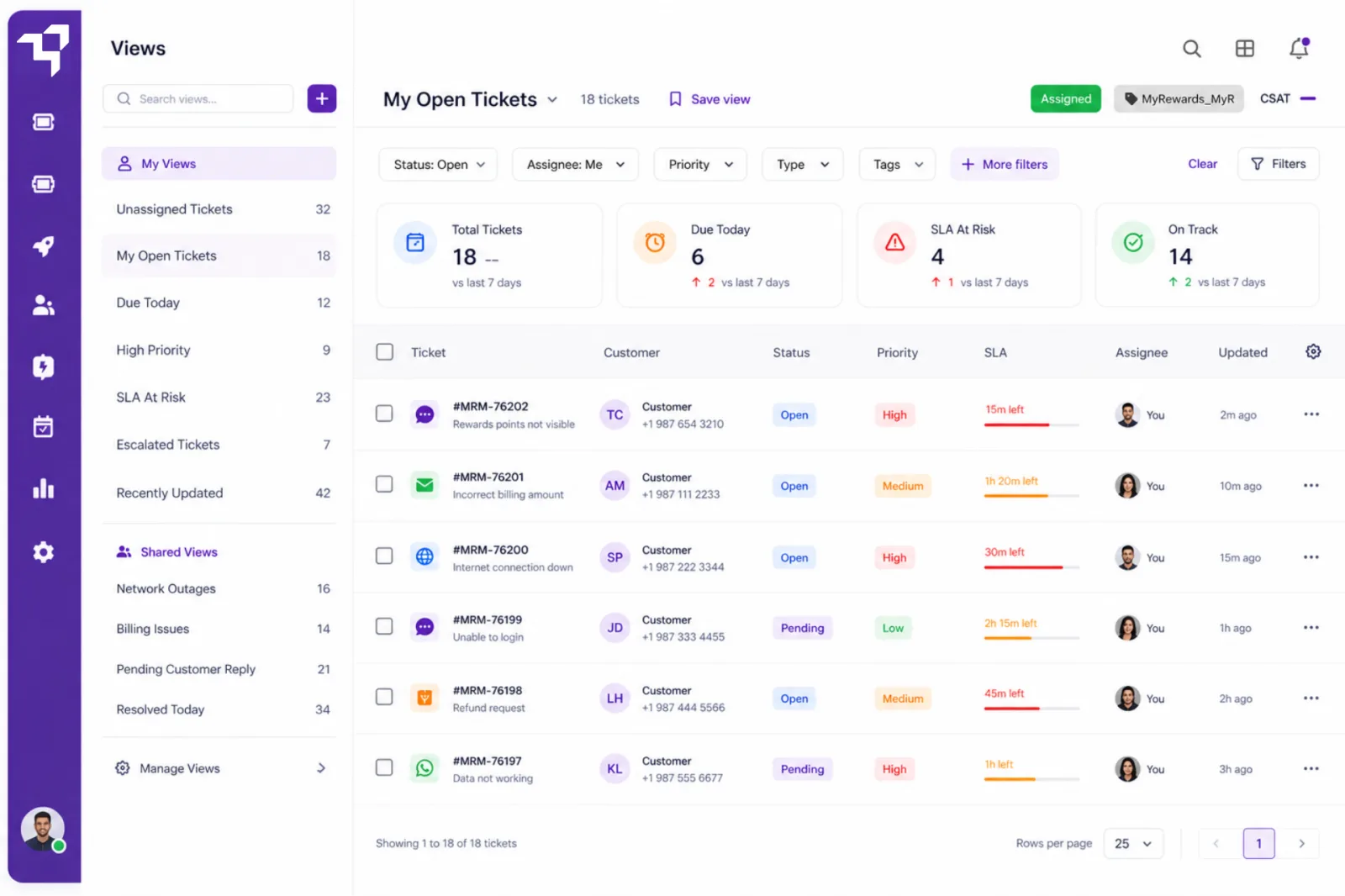
Each role sees the queue they own. Nothing else.
The front-line agent sees unassigned tickets. The team lead sees SLA risk. The complaints specialist sees the escalations. Custom views filter by status, priority, assignee, tag or custom field, and they're shared across the team so everyone is reading from the same board.
- Filter by status, priority, assignee, tag or custom field
- Save views and share them across the team
- Real-time updates as tickets move between queues
- Personal queues for agents, team queues for leads
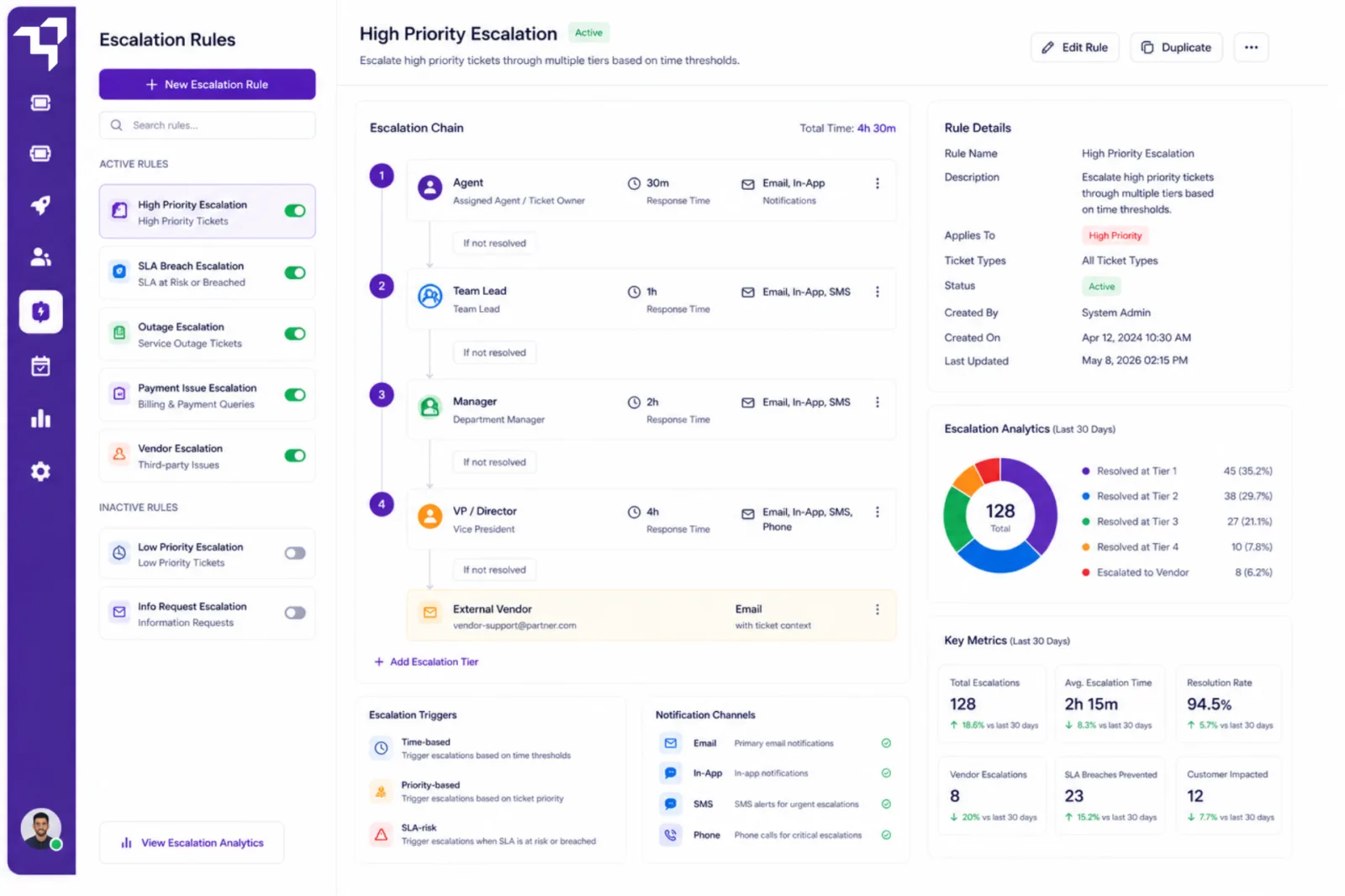
Multi-tier escalation that does not need a meeting
Tier 1 to team lead. Team lead to ops manager. Ops manager to the director if the clock runs out. Each tier has its own trigger, its own notification, its own SLA. The right person gets the right ticket at the right minute, without anyone forwarding an email.
- Multi-tier escalation chains with per-tier triggers
- Notify by email, Slack or Microsoft Teams
- Escalate to external vendors with full ticket context
- Audit trail on every escalation for compliance reviews
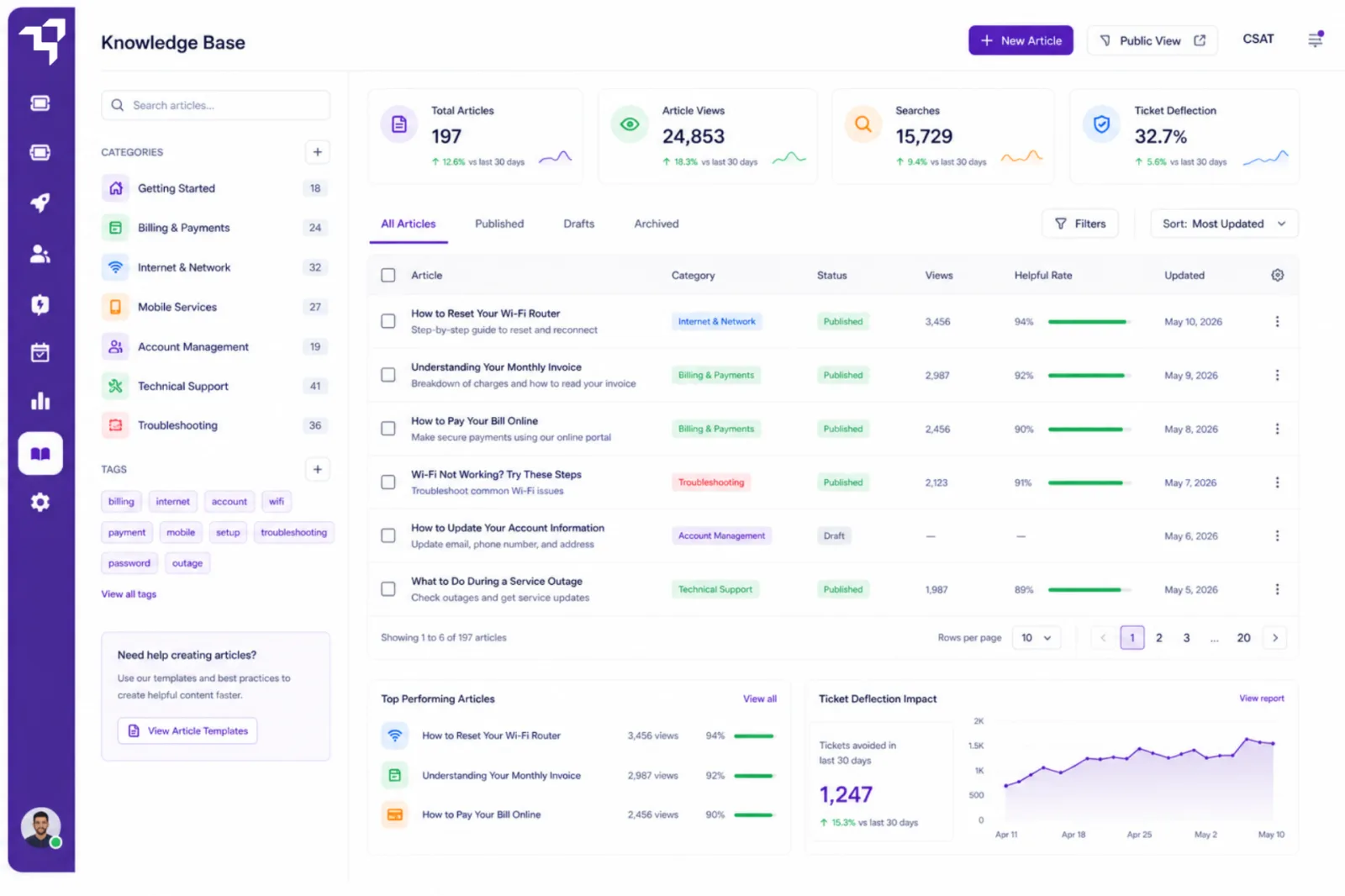
The questions the team answers fifty times a day, answered once
Searchable articles, FAQs and step-by-step guides for the questions the team types out every shift. The customer finds the answer before they raise the ticket. The agent links the article instead of retyping the reply. Inbound volume drops measurably in the first month.
- Searchable article library for customers and agents
- Categories, tags and rich editor for guides and FAQs
- Deflection metrics on every article
- Agent-side suggestions surfaced inside the ticket
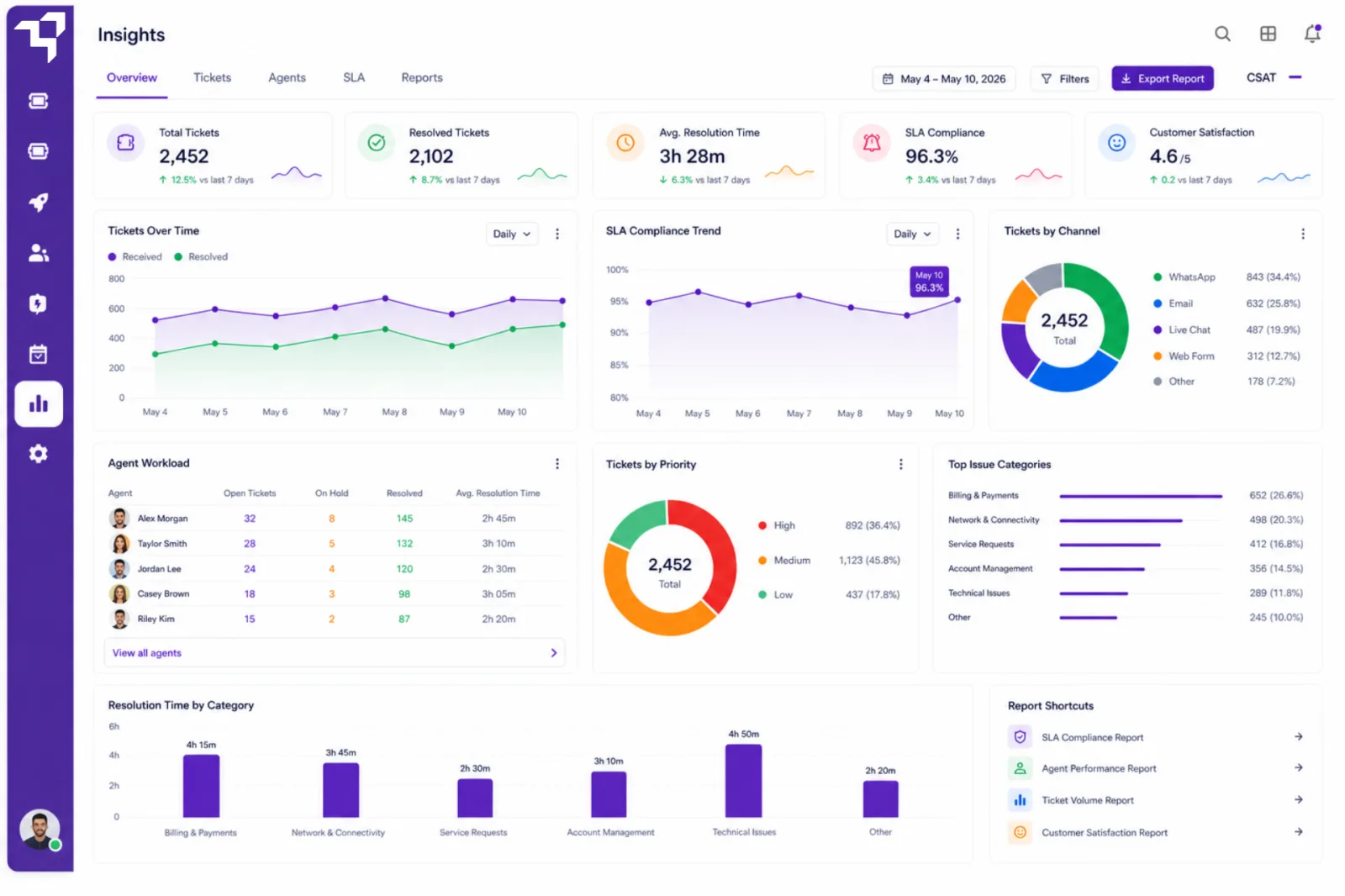
The numbers the Monday meeting actually needs
Ticket volume by channel, first response time, resolution time, SLA compliance, agent workload, CSAT. All updating in real time, all exportable, all schedulable into a Monday morning email. The spreadsheet at midnight is gone.
- Real-time dashboards for volume, SLA, CSAT and workload
- Per-agent and per-queue performance views
- Scheduled daily and weekly digests to email, Slack or Teams
- Export to PDF or CSV for audits and stakeholder reviews
What changes once the queue is owning itself
Cut response time in half by week two
Macros, routing and saved views remove the busywork the team was doing by hand. The first reply lands faster on every channel.
Give the team a queue they can actually own
Front-line agents, team leads and specialists each see the slice of work that is theirs. No one is firefighting the wrong inbox.
Stop SLAs breaching before the customer notices
At-risk tickets surface long before the deadline. Auto-escalation moves them to the right person before the apology email.
Deflect the repeat questions to the knowledge base
The team answers the new questions, not the same ten every shift. Inbound volume drops measurably in the first month.
Walk into Monday with the report already in your inbox
Scheduled SLA, CSAT and workload digests arrive on their own. No CSV exports, no late-night spreadsheets.
The service teams the platform runs the queue for every day
The old way vs. a queue that owns itself
The old way
- ✕Tickets scattered across four different inboxes
- ✕SLA breaches found after the customer escalates
- ✕Same questions retyped fifty times a day
- ✕Weekly report cobbled together in Excel at midnight
- ✕Six month rollout before the first ticket lands
With Ticketing
- ✓One unified queue across every channel
- ✓At-risk tickets surfaced before the SLA breaches
- ✓Macros and a knowledge base that handle the repeats
- ✓Scheduled digests landing in inboxes on their own
- ✓Live in days, with the team already working from it
Flexible plans to fit every support team
All prices in USD. An interface designed to convert.
Starter
Essential ticketing features to get your support team started.
Starting from
Core Capabilities
- Email-to-Ticket
- Auto-responses & Triggers
- Shared Inbox
- SLA Basic
- Basic Automation
- Basic Dashboard
- Email Integration
Growth
Advanced features to scale collaboration and efficiency.
Starting from
Everything in Starter, plus
- Multi-channel Support (email, portal, chat)
- Automation & Workflows
- Reporting & Analytics
- API Access
- Role Permissions
- Priority Support
Elite
Powerful automation and control for growing teams.
Starting from
Everything in Growth, plus
- Advanced Automation
- Approval Workflows
- Full API Access
- IP Whitelisting
- Premium Multichannel Support
Enterprise
Custom solutions with enterprise-grade reliability and security.
Premium Service
- Dedicated Account Manager
- Uptime SLA
- On-prem or Private Cloud Options
- Custom Reporting
- CRM & SSO Integrations
- Dedicated Onboarding
* Indicative starting prices in USD per agent per month. Final pricing scales with seats, channels and integrations. The team will confirm exact figures after the discovery call.
The questions every support lead asks.
Plain answers to the things support teams actually ask before moving off legacy ticketing.
Explore by use case
Dedicated guides for the jobs the platform is built for.
See how the platform stacks up
Let the platform own the queue.You own the customer.
Book a demo and see the platform configured for a team like yours move a real queue in under 30 minutes.
Real humans behind every reply . Response within 1 business hour